How to Make Text to Speech
Text to speech is everywhere right now. YouTube videos. TikTok content. Audiobooks. Podcasts.
Creators are generating voiceovers in minutes. Businesses are automating announcements. Authors are producing audiobooks without recording studios. The technology went from robotic to natural-sounding practically overnight.
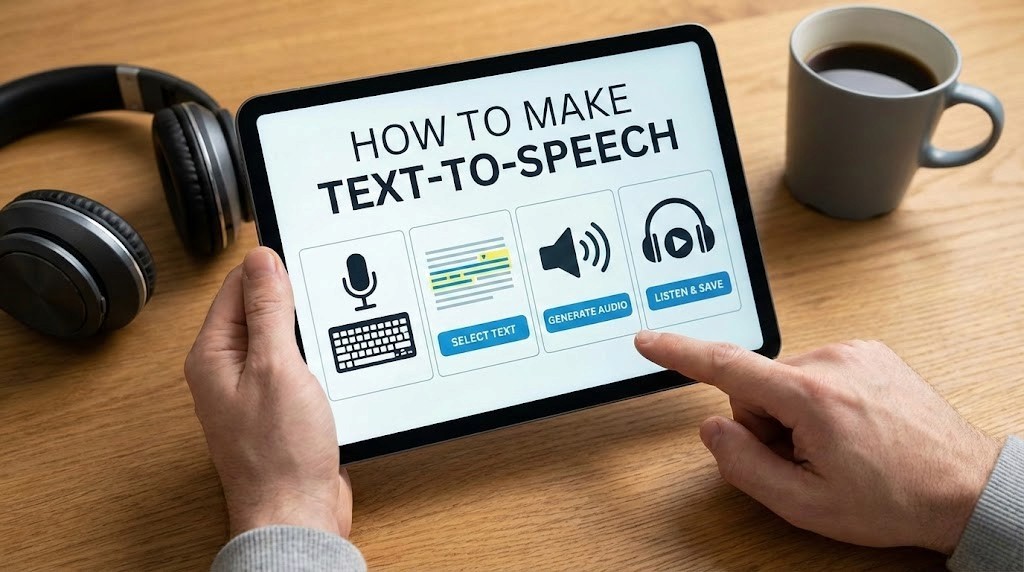
Try AI Voices makes text to speech accessible to anyone. No technical knowledge. No expensive equipment. No recording studios. Type your text, select a voice, generate audio.
We spent 60+ hours testing every feature on Try AI Voices. Generated over 800 audio samples. Tested celebrity voices, character voices, and custom voices. Explored different languages, emotions, and applications.
This complete guide shows you exactly how to convert text to speech using Try AI Voices, step-by-step tutorials for different content types, how to customize voices for natural results, and professional applications for content creation and business.
Let's start with the basics of getting started.
Getting started with Try AI Voices text to speech
Try AI Voices makes text to speech simple. The entire process takes less than 2 minutes from signup to downloaded audio.
Creating your account
Visit Try AI Voices and click the signup button. Enter your email and create a password. Verify your email address. That's it.
The signup process is straightforward. No payment required immediately. No complex verification. Just email, password, verify.
Once logged in, you land on the main voice generation interface. Everything you need is visible immediately. No hunting through menus. No confusing navigation.
Understanding the interface
The Try AI Voices interface prioritizes simplicity. Three main elements: voice selection, text input, and generation controls.
Voice library: Browse hundreds of voices organized by category. Celebrity voices like Obama and Trump. Character voices including Spongebob and Peter Griffin. Disney characters. Rapper voices. Original AI voices.
Search by name or browse categories. Each voice includes a preview sample. Listen before generating to confirm it matches your needs.
Text input box: Type or paste your script. The platform handles text up to several thousand characters per generation. Longer scripts can be broken into multiple generations.
Generation controls: Click generate. Download as MP3 or WAV. That's the core workflow. Advanced settings are available but optional.
Your first text to speech generation
Let's create your first audio. This takes under 60 seconds.
Step 1: Select a voice. For testing, try a familiar celebrity voice. Trump AI voice or Obama work well for first tests because you know exactly how they should sound.
Step 2: Type your text. Start simple. "Hello, this is a test of text to speech technology." Short phrases work better for learning the system.
Step 3: Click generate. Try AI Voices processes your request in seconds. No queue. No waiting.
Step 4: Listen to the result. The audio plays directly in your browser. Hear the quality immediately.
Step 5: Download if satisfied. Click download for MP3 or WAV format. Use the audio however you need.
That's the complete workflow. You just converted text to speech.
Exploring the voice library
Try AI Voices offers hundreds of voices across multiple categories. Understanding what's available helps you choose the perfect voice for your content.
Celebrity voices
The platform includes dozens of recognizable celebrity voices. Politicians like Trump and Obama. Actors, musicians, public figures. Each voice captures the person's distinctive speaking style, accent, and personality.
Celebrity voices work excellently for:
Parody and comedy content
Political commentary videos
Entertainment and meme creation
Social media viral content
Educational content about public figures
Each celebrity voice on Try AI Voices includes samples showing the voice quality. Preview before generating to ensure it matches your expectations.
Character voices
Character voices bring fictional personalities to life. Cartoon characters like Spongebob and Peter Griffin. Disney characters from classic and modern films. Video game characters. Anime characters.
Character voices excel for:
YouTube storytelling and narration
Kids' content and entertainment
Gaming content and streams
Fan content and parodies
Educational content for children
Sonic AI voice captures the energetic, confident delivery. Disney AI voices replicate beloved characters across the entire Disney catalog. Each character maintains their distinctive personality in generated audio.
Rapper and musician voices
Rapper voices capture hip-hop delivery, flow, and style. Drake, Travis Scott, Kanye, Eminem, Pop Smoke, Juice WRLD, and many more. These voices understand rap cadence, not just vocal tone.
Musician voices work for:
Music demos and reference tracks
Rap parodies and comedy
Lyric videos and visualizers
Hip-hop content creation
Song idea development
The rapper voices on Try AI Voices handle different flow styles. Melodic rappers sound smooth. Aggressive rappers carry appropriate energy. Technical rappers maintain clarity at rapid speeds.
Original AI voices
Beyond celebrities and characters, Try AI Voices includes original AI voices. Professional-sounding voices without celebrity likeness. Male and female options. Different ages, accents, and speaking styles.
Original AI voices suit:
Business presentations and explainers
Audiobook narration
E-learning and training content
Podcast intros and outros
Commercial voiceovers
These voices provide professional quality without celebrity associations. Perfect for projects requiring neutral, professional sound.
Writing text for natural-sounding speech
How you write your text dramatically affects output quality. Text optimized for reading often sounds awkward when spoken aloud.
Writing conversationally
Text to speech sounds most natural when the input text mimics natural speech patterns.
Use contractions: Write "don't" instead of "do not." "Can't" instead of "cannot." "It's" instead of "it is." Contractions are how people actually speak. Formal written style sounds stiff when spoken.
Shorter sentences work better: Long, complex sentences sound confusing in audio. Break them up. "The technology works well" sounds better than "The technology, which has been developed over many years, works quite effectively."
Use simple vocabulary: Save big words for writing. Speech prioritizes clarity. "Use" sounds better than "utilize." "Help" beats "facilitate." Choose the simpler word unless the complex one is truly necessary.
Write like you talk: Read your text aloud before generating. Does it sound natural? Would you actually say these words in conversation? If not, rewrite until it does.
Punctuation for better pacing
Punctuation controls pacing, pauses, and delivery in text to speech.
Periods create full stops: The AI pauses naturally at periods. Use them to separate distinct ideas. "This is one thought. This is another thought." The pause helps listeners process each statement.
Commas create brief pauses: Use commas for natural breathing points. "First, you need to understand the basics, then you can move to advanced techniques." The commas guide pacing.
Exclamation points add energy: "This is amazing!" sounds more energetic than "This is amazing." Use exclamation points where you'd naturally emphasize excitement.
Question marks add inflection: "Are you ready?" sounds different from "Are you ready." The question mark creates upward inflection naturally.
Ellipses create longer pauses: "And then... everything changed." The ellipsis creates dramatic pause. Use sparingly for effect.
Handling numbers and special characters
Try AI Voices interprets numbers and symbols intelligently, but some require special formatting.
Spell out numbers in dialogue: Write "twenty-three" instead of "23" when you want it spoken as words. The number "23" might be read as "two three" in some contexts.
Use words for money: Write "twenty dollars" instead of "$20" for clearer pronunciation. "$20" might be read awkwardly depending on context.
Spell out abbreviations: Write "New York" instead of "NY" unless you specifically want the letters spoken. "Doctor Smith" sounds better than "Dr. Smith."
Avoid excessive formatting: Bold, italics, and other formatting doesn't affect audio. Keep text clean and simple.
Optimizing for specific voices
Different voice types need different writing styles.
Celebrity voices: Write content matching how that celebrity actually speaks. Trump uses short, punchy sentences with repetition. Obama uses longer, more measured statements. Match their natural speaking patterns.
Character voices: Match character personality. Spongebob uses enthusiastic, simple language. Peter Griffin uses casual, conversational style. Write dialogue that fits the character.
Rapper voices: Write in hip-hop style. Short phrases. Rhythmic patterns. Slang appropriate to the artist. Check the rapper voice guide for detailed tips on writing for rap delivery.
Professional voices: Business and educational content needs clear, authoritative writing. Complete sentences. Professional vocabulary. Proper grammar. These voices excel at delivering polished, formal content.
Step-by-step tutorials for different content types
Different projects require different approaches. Here's how to create text to speech for specific applications.
Creating YouTube voiceovers
YouTube content benefits enormously from text to speech. Fast production. Consistent quality. Multiple voice options.
Step 1: Write your script in natural speaking style. YouTube audiences prefer conversational content. Write like you're talking directly to viewers. Short sentences. Clear ideas. Engaging delivery.
Step 2: Choose a voice matching your content. Educational content needs professional voices. Entertainment content can use character voices or celebrity impressions. Gaming content might use energetic character voices like Sonic.
Step 3: Break script into sections. Generate your intro separately from main content and outro. This gives you control over each section's pacing and energy. Easier to regenerate one problem section than the entire video.
Step 4: Generate audio on Try AI Voices. Paste each section. Select your voice. Generate. Download WAV format for best quality in video editing.
Step 5: Import audio into video editor. Sync audio with visuals. Add music and sound effects. Balance voice volume against background elements.
Pro tips: Generate slightly longer pauses between sections by adding extra periods. "End of section... Next section begins." The pause gives you editing flexibility.
Making TikTok and short-form content
Short-form content needs punchy, immediate impact. Every second counts.
Step 1: Write ultra-concise scripts. 15-30 seconds means roughly 40-80 words. Cut every unnecessary word. Start with the hook immediately. No preambles.
Step 2: Choose distinctive voices. Celebrity voices and characters grab attention fast. Trump, Spongebob, Disney characters - these voices make people stop scrolling.
Step 3: Front-load the value. Your first sentence determines whether viewers keep watching. "Here's why..." or "You won't believe..." or "The secret is..." - hooks matter enormously.
Step 4: Generate on Try AI Voices. Short content generates in seconds. Download MP3 for mobile-friendly file sizes.
Step 5: Match audio to quick cuts. Sync voiceover with fast-paced visuals. Change visual every 2-3 seconds to maintain attention.
Pro tips: Exclamation points add energy for short-form content. "This is amazing!" sounds more engaging than "This is amazing." Energy matters more in short formats.
Producing audiobook narration
Audiobooks require sustained quality over long durations. Choose voices with appropriate tone for your genre.
Step 1: Format your manuscript for audio. Remove chapter headings you don't want read aloud. Add pauses between paragraphs. Clean up formatting that works visually but sounds awkward.
Step 2: Choose appropriate narrator voice. Fiction benefits from expressive, character-appropriate voices. Non-fiction needs clear, authoritative professional voices. Try AI Voices offers options for both.
Step 3: Generate in chapters. Don't attempt entire books in one generation. Break into chapters. This gives you manageable file sizes and quality control per chapter.
Step 4: Maintain consistency. Use the same voice throughout. Keep settings identical across all generations. Consistency matters enormously over book-length content.
Step 5: Add chapter markers. In post-production, insert clear chapter divisions. Helps listeners navigate longer content.
Pro tips: Add extra line breaks between paragraphs in your source text. The pauses help listeners process transitions between ideas. Natural pacing prevents listener fatigue.
Creating podcast intros and outros
Podcast segments benefit from professional, branded audio that stays consistent across episodes.
Step 1: Write your standard intro copy. Include show name, episode number placeholder, and host introduction. Keep it under 30 seconds for listener retention.
Step 2: Choose a professional voice. Your intro represents your brand. Select a voice with appropriate authority and personality. Original AI voices often work better than celebrity voices for branded content.
Step 3: Generate your template. Create the standard intro once on Try AI Voices. Download high-quality WAV file. This becomes your template for all episodes.
Step 4: Add music and effects. Layer the voiceover over your intro music. Add sound effects for polish. Process with compression and EQ to match your overall audio quality.
Step 5: Update episode-specific details separately. Generate "Episode 47" or specific episode titles separately. Drop into your template. This saves regenerating the entire intro each time.
Pro tips: Generate multiple intro variations initially. Test which sounds best in your overall mix. Keep the winner as your standard template.
Making business presentations
Business and corporate content requires professional, authoritative delivery.
Step 1: Write formally but clearly. Business content needs professionalism without being stuffy. Clear language. Complete sentences. Proper grammar. Avoid jargon unless your audience expects it.
Step 2: Select professional AI voices. Avoid celebrity and character voices for business content. Choose neutral, professional-sounding voices from Try AI Voices original voice collection.
Step 3: Script with slide transitions in mind. Mark where slide changes occur in your script. "Moving to the next slide..." or natural transitions help sync audio with visuals.
Step 4: Generate presentation sections. Create audio for introduction, each major section, and conclusion separately. Easier to revise sections without regenerating everything.
Step 5: Sync with slides in presentation software. Import audio into PowerPoint, Keynote, or Google Slides. Time slide advances to match audio narration.
Pro tips: Slightly slower pacing works better for business content. Add extra pauses after complex information. Gives listeners time to process charts and data.
Advanced techniques for professional quality
Once you master basics, these techniques push quality higher and create more natural results.
Adding emotion and emphasis
Text to speech has evolved beyond monotone delivery. Modern AI voices handle emotion and emphasis effectively with proper scripting.
Use exclamation points for excitement: "This is incredible!" sounds more energetic than "This is incredible." The punctuation guides emotional delivery.
CAPS for emphasis: Some voices respond to ALL CAPS as emphasis cues. "This is VERY important" might emphasize "very" more than "This is very important." Test with your chosen voice.
Italics for stress: In some contexts, italicized words receive subtle stress. Not all voices respond to this, but worth testing.
Write emotion into the text: Instead of trying to make the AI sound sad, write text that's inherently emotional. "I can't believe she's gone" carries emotion in the words themselves.
Vary sentence structure: Mix short punchy sentences with longer flowing ones. The variation creates natural rhythm preventing monotone delivery.
Creating dialogue and conversations
Multi-character dialogue requires special techniques in text to speech.
Generate each character separately: Select one voice on Try AI Voices. Generate that character's lines. Switch voices. Generate the other character's lines. Combine in post-production.
Add character tags: Write "Character A: Hello there." "Character B: Hi, how are you?" This keeps dialogue organized when generating multiple characters.
Leave space for natural overlap: In real conversations, people slightly overlap. Generate with slight pauses, then edit timing in audio software to create realistic conversation flow.
Match voices to characters: Character voices on the platform work great for animated-style dialogue. Spongebob talking to Peter Griffin creates clear character distinction.
Add reactions between lines: Generate small reaction sounds or acknowledgments. "Mm-hmm." "Yeah." "Right." These verbal nods create conversation realism.
Handling multiple languages
Try AI Voices supports multiple languages beyond English. Creating multilingual content expands your audience reach.
Choose native speakers for each language: Don't use English voices for Spanish text. Select voices specifically trained for the target language. Pronunciation and accent matter enormously.
Write in the target language natively: Machine translation often creates awkward phrasing. If possible, have native speakers write or review text before generating audio.
Understand cultural speaking styles: Different languages have different speaking rhythms and styles. Spanish often uses longer, more flowing sentences. German uses more direct structures. Match writing style to language conventions.
Test pronunciation of proper nouns: Names and places might need phonetic spelling. "José" might need adjustment depending on the voice's training data.
Optimizing audio for different platforms
Different platforms have different audio requirements. Optimize text to speech output for each destination.
YouTube and long-form video: Use WAV format from Try AI Voices for highest quality. Process with compression and EQ to match your overall video audio. Aim for -3dB to -6dB peak levels to prevent clipping.
TikTok and Instagram: MP3 format works fine for mobile-first platforms. Slightly boost volume for competing with background music and sound effects. Keep total length under platform limits.
Podcasts: WAV format for editing, export final podcast as high-quality MP3 (192kbps minimum). Ensure consistent volume across all segments using compression and normalization.
Audiobooks: WAV format initially. Process to meet specific audiobook platform requirements (ACX has detailed specs). Room tone and consistent background noise levels matter for audiobook quality.
Web and presentations: MP3 strikes best balance between quality and file size for web delivery. 128kbps works for most applications. Higher bitrates for professional applications.
Professional applications and use cases
Text to speech unlocks possibilities across industries and applications. Understanding real-world use cases helps you leverage the technology effectively.
Content creation and social media
Content creators use Try AI Voices for rapid content production at scale.
YouTube channels: Creators generate voiceovers for explainer videos, top-10 lists, news commentary, and educational content. Text to speech enables daily uploads without recording sessions. Channels focused on facts and information particularly benefit.
TikTok and Instagram content: Viral content creators use celebrity and character voices for comedy skits, parodies, and trending content. Trump and Obama voices create political humor. Character voices like Spongebob engage younger audiences.
Podcast production: Independent podcasters generate intro sequences, ad reads, and guest introductions. Consistent professional audio without hiring voice talent.
Animation and storytelling: Animators voice their characters using Try AI Voices. Disney voices help create fan content and parodies. Original stories get professional narration.
Business and corporate applications
Businesses leverage text to speech for customer-facing and internal communications.
Training and e-learning: Companies create training modules with professional narration. Update content easily without re-recording everything. Translate training into multiple languages efficiently.
Customer service automation: Automated phone systems use text to speech for dynamic responses. Generate personalized messages based on customer data.
Marketing and advertising: Rapid prototyping of audio ads. Test multiple voice options quickly. Generate localized versions for different markets.
Presentation narration: Sales teams add professional voiceovers to pitch decks. Investors receive self-narrating presentations.
Internal communications: Company announcements, policy updates, and training materials gain professional voice without hiring talent or booking studio time.
Educational content and accessibility
Education sector adopts text to speech for teaching and accessibility.
Online courses: Course creators narrate lessons using Try AI Voices. Update course content without re-recording hours of video.
Language learning: Students hear proper pronunciation across multiple languages. Native speaker voices help develop listening skills.
Audiobook creation: Authors self-publish audiobooks without expensive narrator fees. Update editions easily when content changes.
Accessibility for visual impairments: Websites, documents, and digital content become accessible through audio alternatives.
Study aids: Students convert textbooks and study materials to audio for learning while commuting or exercising.
Entertainment and gaming
Entertainment industry uses text to speech creatively.
Game development: Indie developers voice thousands of dialogue lines without hiring voice actors. Update game dialogue during development without expensive re-recording sessions.
Voice mods and streaming: Streamers use character voices for entertainment. Create unique streaming personas.
Music production: Producers create rapper vocals for demos and reference tracks. Test song ideas before studio sessions.
Comedy and parody: Content creators generate celebrity impressions for sketches. Political comedy uses political figure voices for satire.
Software and app development
Developers integrate text to speech into applications.
Voice assistants: Apps generate spoken responses to user queries. Provide information audibly without requiring users to read screens.
Navigation and guidance: Apps provide spoken directions and instructions. Users receive information hands-free and eyes-free.
Notification systems: Important alerts delivered audibly ensure users don't miss critical information.
Reading apps: E-readers and document viewers offer audio playback alternative to visual reading.
Accessibility features: Apps become usable by visually impaired users through audio alternatives to visual interfaces.
Tips for maximum quality output
Getting the absolute best results from Try AI Voices requires attention to details beyond just writing good text.
Choosing the right voice for your project
Voice selection impacts results dramatically. Match voice characteristics to content requirements.
Consider audience demographics: Younger audiences respond to character voices and energetic delivery. Professional audiences need authoritative, neutral voices. Match voice age and style to target demographic.
Match voice to content tone: Comedy content works with distinctive celebrity and character voices. Serious content needs professional narration. Educational content benefits from clear, patient-sounding voices.
Test multiple options: Generate the same text with 3-4 different voices. Listen to each. The voice that sounds best in your head might not sound best in actual audio.
Consider accent and dialect: Regional accents affect perceived authenticity. Content about American topics might sound better with American accents. Global content might benefit from neutral accent.
Editing your generated audio
Post-processing enhances text to speech quality significantly.
Remove unwanted breaths and artifacts: Audio editing software lets you cut out problematic sections. Clean breaths. Strange sounds. Digital artifacts. Small edits make big quality improvements.
Adjust pacing with silence: Add 0.5-1 second silence between major sections. This helps listeners process transitions. Too-fast pacing overwhelms audiences.
Normalize volume levels: Ensure consistent volume throughout your audio. Compression and normalization prevent some sections being too quiet or too loud.
Add background music strategically: Background music under voiceover improves production value. Keep music 15-20dB below voice level. Ensure music doesn't compete with voice frequencies.
EQ for clarity: Cut muddy low frequencies (below 80Hz) that make voice sound unclear. Slight boost around 2-4kHz enhances speech intelligibility.
Combining multiple voice generations
Long projects require combining multiple generated audio clips seamlessly.
Maintain consistent settings: Use identical voice and settings across all generations. Even slight variations become noticeable when clips are adjacent.
Crossfade between clips: Don't just butt clips together. Add small 0.1-0.2 second crossfades at transitions. This eliminates clicks and creates smooth flow.
Match room tone: Generated audio from Try AI Voices is very clean. If you're combining with other audio that has background noise, add subtle noise to TTS sections so they match.
Use consistent formatting: If you change formatting (MP3 vs WAV) mid-project, quality differences become audible. Stick with one format throughout.
Testing before finalizing
Always test audio before considering it complete.
Listen on multiple devices: Audio that sounds great on studio monitors might sound muddy on phone speakers. Test on headphones, phone speakers, computer speakers, car audio.
Get feedback from others: Your ears adjust to repeated listening. Fresh ears catch problems you've become blind to. Ask someone unfamiliar with the project to listen.
Check at different volumes: Ensure audio is clear at both low and high volume. Some issues only appear at extremes.
Verify pronunciation: Listen specifically for mispronounced words, names, or technical terms. Catch these before publishing.
Common mistakes and how to avoid them
Everyone makes similar mistakes when starting with text to speech. Avoid these common problems.
Writing for reading instead of speaking
Text that works on page often fails in audio.
The mistake: Using complex vocabulary, long sentences, and formal grammar because it looks professional in writing.
Why it fails: Listeners process audio differently than readers process text. Long sentences cause confusion. Complex words sound pretentious. Formal grammar sounds robotic.
The fix: Read your text aloud before generating. Does it sound natural? Would you actually say these words in conversation? Simplify until it does.
Choosing inappropriate voices
Voice and content must match for credibility.
The mistake: Using comedy voices for serious content or professional voices for entertainment.
Why it fails: Spongebob narrating a business presentation destroys credibility. Professional voice delivering comedy falls flat. Voice and content must align.
The fix: Consider your content's purpose and audience before choosing voice. Match voice personality to content requirements.
Ignoring punctuation
Punctuation controls pacing and delivery in text to speech.
The mistake: Writing walls of text without proper punctuation. "This is the first idea and this is the second idea and here's the third idea and finally the fourth."
Why it fails: The AI has no guidance for pauses. Everything runs together. Listeners can't process information. Comprehension drops dramatically.
The fix: Use periods generously. Commas for breathing points. Proper punctuation throughout. Each sentence should be a distinct thought.
Generating excessive length per clip
Trying to generate entire projects in one go creates problems.
The mistake: Pasting 5,000-word scripts into Try AI Voices and generating everything at once.
Why it fails: Longer generations increase the chance of errors. If something goes wrong at minute 8 of a 10-minute generation, you waste the entire thing. No control over pacing between sections.
The fix: Break content into logical sections. Generate intro, main content sections, and outro separately. This gives quality control per section and easier troubleshooting.
Skipping post-production
Raw generated audio rarely represents final quality potential.
The mistake: Downloading from Try AI Voices and using audio immediately without any processing.
Why it fails: Even great text to speech benefits from basic processing. Volume normalization. Noise reduction. EQ for clarity. Small improvements compound.
The fix: Run generated audio through basic processing. Normalize volume. Apply gentle EQ. Add appropriate background if needed. Five minutes of editing dramatically improves final quality.
Troubleshooting common issues
When text to speech doesn't sound right, these solutions usually fix the problem.
Mispronunciations
The voice mispronounces specific words or names.
Solution: Try phonetic spelling. "José" might need "Ho-say" depending on the voice. Technical terms often need phonetic assistance.
Break compound words with spaces. "Breakthrough" might sound better as "break through" if the voice struggles. Test different spellings.
For repeated problems with specific words, choose a different voice. Some voices handle certain sounds better than others.
Unnatural pacing
The audio sounds too fast, too slow, or has awkward pauses.
Solution: Add or remove punctuation to control pacing. More periods slow things down. Fewer pauses speed things up.
Use ellipses for longer pauses. "And then... everything changed." creates dramatic pause.
Break text into shorter sentences. Long sentences often create pacing problems. "This is one idea. This is another." paces better than "This is one idea and this is another idea."
Inconsistent quality
Some generations sound great, others sound terrible with identical settings.
Solution: Generate multiple versions. Most platforms include some randomness creating variation between generations. Create 3-5 versions. Use the best one.
Check for typos or formatting issues. Sometimes invisible characters or formatting cause problems. Copy text into plain text editor, then paste into Try AI Voices.
Audio artifacts or glitches
Digital sounds, pops, or glitches in generated audio.
Solution: Try regenerating. Sometimes artifacts occur randomly and don't repeat.
Check source text for special characters or unusual formatting. Remove anything non-standard.
Download in WAV format instead of MP3. Higher quality format sometimes reduces artifacts.
If specific phrases always cause artifacts, rewrite those sections with different words. Some word combinations trigger problems in certain voices.
Volume too quiet or too loud
Generated audio doesn't match your other audio sources.
Solution: Use audio editing software to normalize volume. Target -3dB to -6dB peak levels for most applications.
Apply compression to reduce dynamic range. This evens out volume across the entire audio.
Check your platform requirements. YouTube, podcasts, and audiobooks have different target loudness standards. Adjust accordingly.
In case I don't see you, good afternoon, good evening, and good night. Start creating professional text to speech with Try AI Voices today.